
Overview
This article provides information on how to troubleshoot and resolve issues encountered when using the OpenFin Lightweight installer. More information about the Lightweight Installer can be found on our Deployment Options page.
For issues encountered launching the application after the Runtime Version Manager has been installed on the local system please see our Application Launch Issues article.
Prerequisites
To download the OpenFin software, the Assets Location URL must be accessible, the default Assets Location URL is:
Please check with the application owner to confirm if an alternative Assets Location URL has been configured.
The OpenFin lightweight installer requires write access to the installation directory, by default the installation directory is:
%localappdata%\openfin
Installation process
When using the Lightweight installer, the installation process is:
- The installer downloads the OpenFin Runtime Version Manager (RVM) from https://cdn.openfin.co/release/rvm/latestVersion *
- The installer launches RVM with the URL of the Applications Configuration file
- The RVM downloads the OpenFin Runtime version as specified in the Application Configuration file, from https://developer.openfin.co/release/runtime/<Runtime Version> *
- The RVM creates the application icons, as configured in the Application Configuration
* Or the asset server configured by the application developer
Troubleshooting Tools
Installer Logs
The Lightweight Installer will write to the installer.log file located at %localappdata%\openfin\logs.
Installer Console
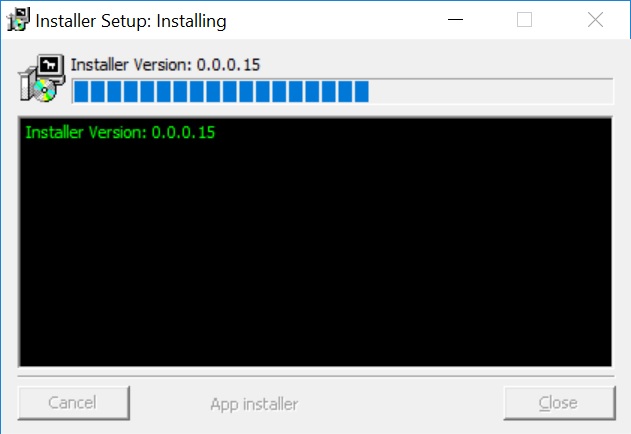
Unless the application developer has configured the installer with the 'No UI' setting, the following console will be visible and will report information about the progress of the installation, including any errors:
Comments
0 comments
Please sign in to leave a comment.